



Screen Fatigue in Online Education: A Guide for Students
The Hidden Toll of Your Digital Campus
As online education becomes the new standard, students are facing an unprecedented amount of screen time. A 2025 review identified that Computer Vision Syndrome (CVS), or digital eye strain, affects a staggering 69% of computer users globally—a figure that has only climbed in the era of remote learning. While the convenience of virtual lectures and digital textbooks is undeniable, it places a unique and prolonged strain on your visual system. This isn't just about feeling tired; it's a physiological response to specific screen-related triggers that can impact your focus, comfort, and academic performance.
This guide moves beyond generic advice. We will break down the science behind screen fatigue, identify the true culprits, and provide a series of actionable, evidence-based strategies tailored for the modern student. From optimizing your study space to making informed choices about eyewear, you will learn how to protect your vision and maintain peak focus during long hours of remote learning.
Understanding the Sources of Screen Fatigue
Digital eye strain isn’t caused by a single factor, but rather a combination of environmental and behavioral triggers that force your eyes to work harder than they do when reading print. Understanding these root causes is the first step toward finding effective relief.
The Unblinking Stare: Why Screens Dry Your Eyes
One of the most significant factors in digital eye strain is a dramatic reduction in blink rate. Under normal circumstances, you blink about 15 times per minute, an action that replenishes the tear film and keeps the cornea hydrated. However, when staring at a digital screen, this rate plummets to just 5-7 times per minute, according to the American Academy of Ophthalmology (AAO). This infrequent and often incomplete blinking leads to tear evaporation, causing the hallmark symptoms of dryness, burning, and a gritty sensation.
The Accommodation Lock: When Focus Becomes Fatiguing
Your eyes contain tiny muscles that contract and relax to focus on objects at different distances—a process called accommodation. When you read from a screen for hours on end, these muscles are locked into a fixed, mid-range focus. This sustained effort, without the natural variation of looking up and around a classroom, leads to muscle fatigue, headaches, and difficulty refocusing on distant objects after a long study session.
The Glare Factor and the Blue Light Question
Glare from windows and overhead room lighting reflecting off your screen forces your eyes to constantly readjust, contributing significantly to strain. While many products are marketed to solve this, it's crucial to separate science from hype.
- Anti-Reflective Coatings: As noted by opticians, these coatings are a student's most effective tool. They work by minimizing the reflections from the front and back surfaces of your lenses, allowing more light to pass through for clearer vision and reducing the visual "noise" that causes eye fatigue.
- Blue Light Filtering Lenses: The conversation around blue light is often misleading. According to the AAO, there is no scientific evidence that blue light from digital screens causes retinal damage. The primary, evidence-based impact of blue light is its effect on your sleep-wake cycle. Exposure to blue light in the evening can suppress the production of melatonin, the hormone that signals your body it's time to sleep. Therefore, as clinical consensus from ophthalmologists at the Cleveland Clinic suggests, blue light filtering glasses are best viewed as a sleep hygiene tool for late-night study, not a direct cure for eye strain itself. For a deeper dive, you can explore if blue light glasses are a good choice for students.
Ergonomics 101: Building a Vision-Friendly Workspace
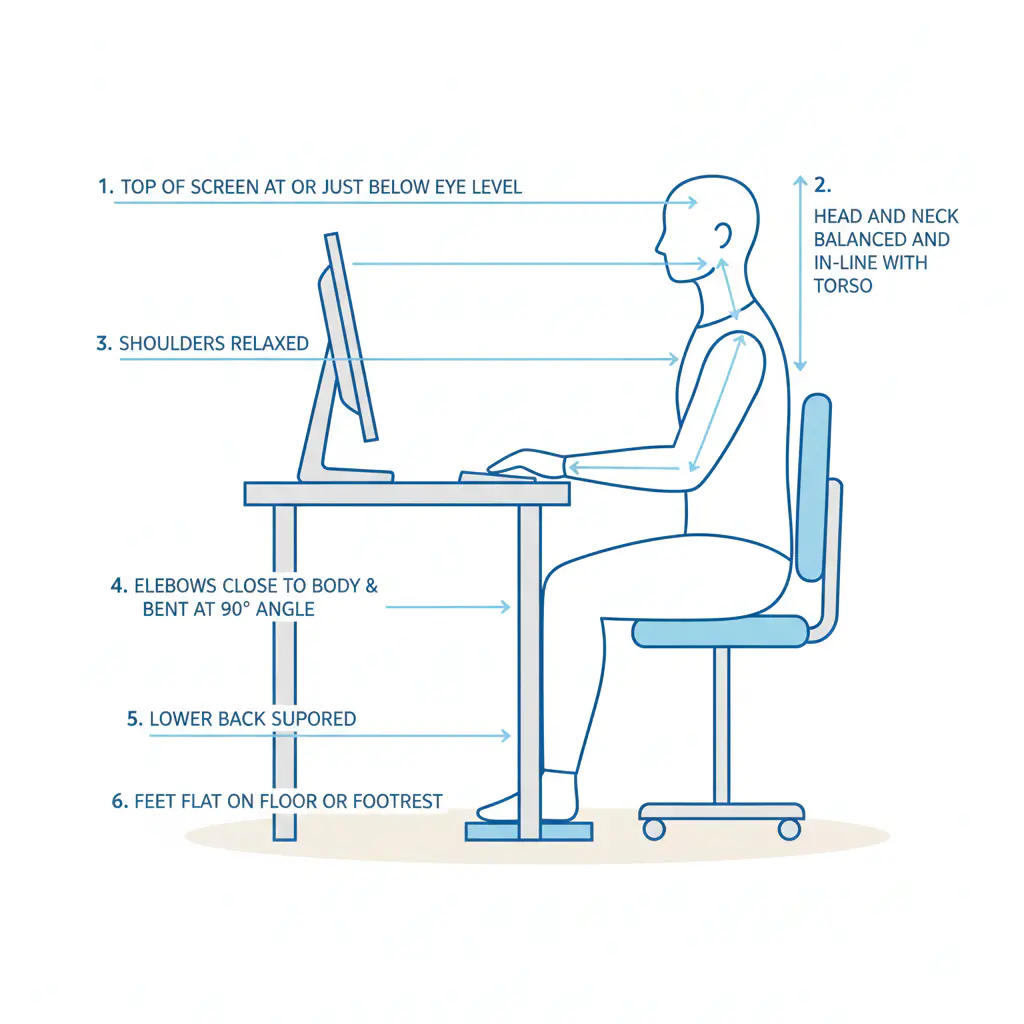
Before you even think about glasses or software, the physical setup of your study area is the most critical factor in preventing screen fatigue. A poor ergonomic setup forces your body and eyes into a state of constant strain. Aligning your workstation with established ergonomic principles provides a foundation of comfort for long study marathons.
The Two Golden Rules of Monitor Placement
Improper monitor height is one of the most common and easily corrected ergonomic mistakes. Follow these two simple rules based on decades of workplace health standards:
- Eye Level: Position your monitor so that the top edge of the screen is at or slightly below your horizontal eye level. You should be looking straight ahead or slightly down, never up. This minimizes strain on your neck and shoulder muscles.
- Arm's Length: The screen should be positioned about an arm's length away from your face. This distance allows you to see the entire screen without excessive eye movement and helps reduce accommodative stress.
Decouple Your Laptop for Health
Laptops are ergonomically flawed by design because the screen and keyboard are fixed together. If the screen is at the right height, the keyboard is too high, and if the keyboard is in the right position, you are forced to hunch over. The only safe way to use a laptop for extended periods is to "decouple" it by using an external keyboard and mouse. This allows you to place the laptop on a stand or stack of books to raise the screen to eye level while keeping the keyboard at a comfortable typing height.
Master Your Lighting Environment
Controlling light and glare is essential. According to OSHA guidelines, lighting for screen-based work should generally be lower than that required for reading paper documents to avoid screen washout. Position your desk so that windows are to your side, not in front of or behind you, to prevent direct glare. Use blinds to control intense sunlight and rely on adjustable task lighting to illuminate your notes without casting reflections on your screen.
Smart Study Habits for Visual Stamina
Ergonomics sets the stage, but your habits during study sessions determine your day-to-day comfort. The key is to integrate frequent, short breaks to give your focusing muscles a rest.
Beyond the 20-20-20 Rule: The "Content Transition" Break
The well-known "20-20-20 rule" (every 20 minutes, look at something 20 feet away for 20 seconds) is effective but often impractical during a fixed 50-minute lecture. A more realistic approach for students is the "Content Transition" micro-break.
How It Works: Instead of watching the clock, use natural breaks in your academic workflow as cues. Finished a video segment? Look out the window for 20 seconds. About to start a new set of practice problems? Stand up and stretch. This method integrates visual rest into your study rhythm without disrupting your flow.
Active Blinking and Hydration
Make a conscious effort to perform full, deliberate blinks, especially when you feel your eyes becoming dry. Additionally, the EPA notes that maintaining indoor humidity between 30-60% can help slow tear evaporation. Using a small humidifier in your study area during dry seasons can make a noticeable difference in comfort.
Your Eyewear: The Final Layer of Defense
Proper eyewear acts as a crucial tool to reduce the baseline level of stress on your visual system. For students, the right lenses can mean the difference between comfortable focus and persistent strain.
The Importance of an Accurate Prescription
Even a minor, uncorrected refractive error (like nearsightedness, farsightedness, or astigmatism) can be a major source of eye strain during screen use. Your visual system has to work overtime to compensate for the blur, a problem that is magnified over hours of study. If you have astigmatism, screen time can be particularly challenging, as the condition already makes focusing on fine text more difficult. Ensuring your prescription is up-to-date is the first and most important step.
Lens Coatings: What Matters for Students
- Anti-Reflective (AR) Coating: This is arguably the most beneficial lens feature for anyone who spends significant time on a computer. It drastically reduces glare from various light sources, improving visual clarity and reducing the strain associated with visual "clutter."
- Blue Light Filtering: As discussed, this is a secondary consideration. If your study schedule requires late nights in front of a screen, these lenses can help regulate your sleep cycle. Think of them as a tool for better sleep, which in turn helps your eyes recover, rather than a direct solution for eye strain. You can learn more about the signs of digital eye strain and how glasses can help.
A Note for Contact Lens Wearers
Contact lenses can exacerbate dryness, as they reduce oxygen flow to the cornea. The AAO advises that for long computer sessions, it's often better to switch to glasses. This gives your eyes a break and helps maintain a healthier tear film. If you must wear contacts, consider keeping rewetting drops handy and explore our guide to finding relief for dry daily lenses from screen time.
Frequently Asked Questions
1. Can screen time cause permanent eye damage? Based on current scientific understanding from major ophthalmological bodies, the blue light from consumer electronics does not cause damage to the retina or lead to eye diseases like macular degeneration. However, prolonged screen time can lead to chronic dry eye disease and is associated with the progression of myopia (nearsightedness) in children and adolescents.
2. Do I need special "computer glasses"? "Computer glasses" are simply glasses prescribed specifically for the intermediate distance of your screen. For many students, a single-vision prescription with a high-quality anti-reflective coating is sufficient. The most important factors are an accurate prescription and AR coating, not a specific brand or price point.
3. How can I stop my glasses from smudging all the time? Clean your glasses daily with a microfiber cloth and a spray cleaner specifically designed for lenses. Avoid using your shirt, paper towels, or harsh chemicals like alcohol, which can damage lens coatings.
Your Action Plan for Focused, Comfortable Learning
Combating screen fatigue is not about finding a single magic bullet; it's about building a system of sustainable habits. Start by creating an ergonomic foundation with your desk and monitor setup. Integrate mindful breaks, like the "Content Transition" method, into your study sessions. Finally, ensure your eyewear is equipped with the right prescription and an anti-reflective coating to provide a clear, comfortable view.
By taking these small, consistent steps, you can reduce the daily toll of digital learning on your eyes, improve your ability to focus, and invest in your long-term visual health.
Disclaimer: This article is for informational purposes only and does not constitute professional medical advice. If you are experiencing persistent eye discomfort, headaches, or vision changes, please consult with a qualified optometrist or ophthalmologist. Pre-existing conditions may require specialized ergonomic or medical guidance.