


Why Polarized Sunglasses Make LCD Screens Look Dark or Distorted
The Glare-Free Dilemma: Why Your Screens Look Strange
You slip on your favorite polarized sunglasses and the world snaps into sharp, glare-free clarity. The harsh reflection off the road vanishes, and the surface of the water becomes transparent. But then you glance at your car's digital radio display, your phone, or the gas pump screen, and you're met with a dark blotch, a weird rainbow pattern, or a screen that looks completely black.
If this has happened to you, you're not alone. It's not a defect in your sunglasses or your device. It's a fundamental clash between two powerful technologies: the polarization in your lenses and the polarization that creates the image on most digital screens. This guide explains the science behind this phenomenon, which devices are most affected, and what you can do about it.
Light, Glare, and the "Picket Fence" Filter
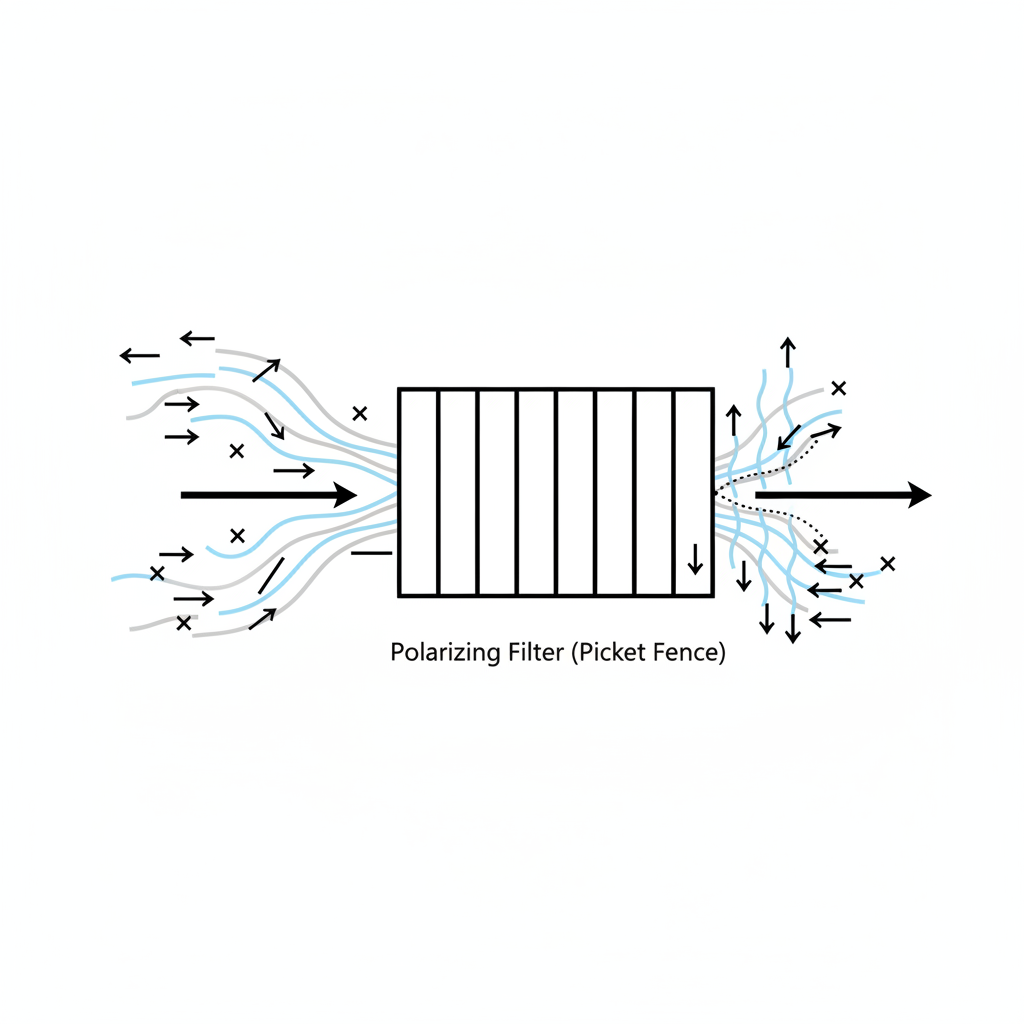
To understand the issue, we first need to understand light itself. Light travels in waves, and natural sunlight is typically "unpolarized," meaning its waves vibrate and scatter in all directions.
However, when light reflects off a flat, horizontal surface like a road, a body of water, or the hood of a car, it becomes concentrated and polarized horizontally. This is what we experience as blinding glare.
Polarized sunglasses are designed specifically to combat this. As Harvard Health explains, these lenses are treated with a special chemical laminate that creates a vertical polarization filter. Think of this filter as a microscopic "picket fence." It allows the normal, vertically-oriented ambient light to pass through, but it blocks the intense, horizontally-oriented light waves of glare. The result is a clearer, more comfortable view with enhanced contrast.
How Your LCD Screens Make an Image
Here's where the conflict begins. The vast majority of digital displays—from your phone and laptop to your car's infotainment system and digital watch—are a form of Liquid Crystal Display (LCD). And at its core, an LCD screen works by manipulating polarized light.
A simple LCD screen has several layers:
- A Backlight: The source of illumination.
- A First Polarizing Filter: It takes the unpolarized backlight and polarizes it in one direction (e.g., horizontally).
- A Liquid Crystal Layer: This layer is made of tiny crystals that can be twisted or untwisted by an electrical current. Their job is to rotate the light that passes through them.
- A Second Polarizing Filter: This filter is oriented at a 90-degree angle to the first one (e.g., vertically).
To create an image, the screen selectively applies voltage to the liquid crystals. When the crystals twist the light from the first filter by 90 degrees, it can then pass through the second filter to your eye, creating a bright pixel. When the crystals don't twist the light, it remains blocked by the second filter, creating a dark pixel.
Crucially, this means the light leaving your screen is always polarized. The specific angle of this polarization depends on the screen's design, with older or lower-cost TN (Twisted Nematic) panels found in things like budget monitors and car radios being the most common culprits for this effect.

The Clash: When Two Polarizers Misalign
The problem occurs when the polarized light from an LCD screen meets the polarized filter of your sunglasses. You now have two "picket fences" stacked on top of each other.
- Blackout Effect: If the light from the screen is polarized horizontally and your sunglasses have a standard vertical filter, the two filters are at a 90-degree angle to each other. Your sunglasses will block almost all the light from the screen, making it appear black or very dark. This is the most common scenario.
- Dimming & Distortion: If the two polarizing filters are at a different angle (e.g., 45 degrees), only some of the light is blocked. This results in a dimmed screen or the appearance of strange rainbow-like patterns and dark splotches. These "rainbows" are often caused by viewing the internal stress patterns within the plastic layers of the screen, a phenomenon known as photoelasticity.
The Head-Tilt Trick: You may have instinctively discovered the solution. As observed by many boaters and drivers, simply tilting your head can often make the screen visible again. This works because you are changing the angle of your sunglasses' filter relative to the screen's filter, breaking the 90-degree alignment and allowing light to pass through.
Practical Solutions for a Polarized World
While the head-tilt trick works in a pinch, it's not always practical or safe. Here are better solutions for common scenarios.
For Drivers: Prioritizing Safety and Visibility
Digital dashboards, heads-up displays (HUDs), and infotainment screens are critical for modern driving. Having them black out is a significant safety hazard. The Federal Aviation Administration (FAA) explicitly advises pilots against wearing polarized lenses precisely because they can interfere with LCD cockpit instruments.
- The Best Solution: Use high-quality, non-polarized sunglasses for driving. A good pair of non-polarized lenses with 100% UV400 protection will keep your eyes safe from the sun without compromising the visibility of your essential displays. As experts from the MD Anderson Cancer Center note, UV protection is the critical safety feature, not polarization. For more on this, see our guide on UV protection sunglasses for driving.
- The Compromise: If you only have polarized lenses, be aware of the issue. Identify which screens are affected and know that you may need to tilt your head to read them. For long drives, investing in a dedicated non-polarized pair is the safer choice.
For Outdoor Screen Use: Phones, Tablets, and Laptops
It's frustrating when the sunglasses you need to see in the bright sun are the very thing preventing you from seeing your screen.
- Rotate Your Device: The easiest trick is to rotate your phone or tablet 90 degrees. Often, the polarization axis is different in portrait vs. landscape mode, and one orientation will be perfectly clear.
- Increase Brightness: Maxing out your device's screen brightness can sometimes push enough light through the filters to make it legible, though this will drain your battery faster.
For Professionals: Pilots, Boaters, and Operators
For professionals who rely on digital displays for navigation and safety, the FAA's advice is paramount.
- Go Non-Polarized: There is no substitute for a quality pair of non-polarized lenses. The AOA recommends gray lenses for accurate color recognition, which is vital for reading color-coded signals on instruments.
- Consider an "Eyewear Wardrobe": As AARP notes in its guidance, having different glasses for different tasks is a smart strategy. A dedicated pair of polarized sunglasses for fishing or beach days and a separate, non-polarized pair for driving or flying ensures you always have the right tool for the job.
Frequently Asked Questions
1. Are my sunglasses broken? No. The blackout effect is a normal result of how polarized lenses and LCD screens work. You can test this by looking at a screen and slowly rotating your sunglasses in your hand; you will see the screen brighten and darken.
2. Do all polarized sunglasses cause this? Yes, the effect is present in all polarized lenses because it is fundamental to how they reduce glare. Some very high-end lenses may use circular polarizers that can lessen the effect, but it can still occur with certain screens.
3. Are non-polarized sunglasses less safe? No. Safety comes from UV protection. As long as your sunglasses are labeled "100% UV Protection" or "UV400," they are protecting your eyes from harmful radiation. Polarization is a feature for comfort and visual acuity, not UV safety.
4. What are the rainbow patterns I see on screens and car windows? You are seeing evidence of stress in the material. Tempered glass (like in rear car windows) and the plastic layers of LCD screens have internal stress patterns that become visible when viewed through a polarizing filter.
Ultimately, choosing between polarized and non-polarized sunglasses comes down to your primary activity. For a life free of glare on the water and road, polarization is unmatched. But for a life that involves interacting with digital screens, especially while driving, a pair of classic UV400 non-polarized lenses is often the clearer, safer choice.
Disclaimer: This article is for informational purposes only and does not constitute professional advice. When driving or operating machinery, prioritize the clear visibility of all safety and navigation displays.